
Upload one image and Pressria removes the background, creates the white layer, and shapes a stable flat-bottom cut line. The finished thick acrylic stands as one piece — no slot, separate base, or assembly required.
Browser editor for customers · One-piece construction · Automatic multi-piece nesting


What is a korotto?
A korotto is a one-piece self-standing acrylic figure. Its lower edge is shaped into a stable flat bottom, so the finished thick acrylic stands upright without a separate base or slot. Its compact format makes characters and mascots easy to collect or produce as a set.
Unlike a conventional two-piece acrylic stand, there is nothing to assemble. Upload one image and Pressria creates the subject outline, flat-bottom cut line, and white layer for the one-piece format. Where the artwork does not reach the baseline, the required area remains clear. Multiple designs can then continue to production nesting.
How it works
No design software, no manual cut lines. Upload, arrange, download — that's it.
Upload any drawing or photo you want turned into a korotto. The background is removed automatically.
Pressria shapes the lower edge into a stable flat bottom so the finished thick acrylic can stand as one piece. You can also bundle several designs as a set.
A print-ready PDF with the one-piece flat-bottom cut line and white layer is created right away. Multiple figures can also be prepared for production nesting.
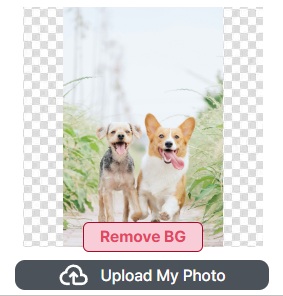
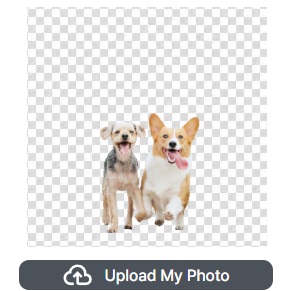
Background removal
A korotto is smaller than the palm of your hand, so even a sliver of leftover background stands out. The moment you upload an image, the background is removed automatically, and a body cut line sized for the mini format is drawn along the subject's outline. No manual masking, no pen tool.
Key features
The smaller the goods, the more repetitive work piles up. This removes the repetition and carries everything through to print-ready, automatically.
Upload an image and only the subject is kept, cleanly. Edges stay crisp even at a small size.
The body cut line is generated automatically to fit the small korotto size. Even fine silhouettes are captured reliably at mini scale.
The cut line forms a flat lower edge so the thick acrylic can stand as one piece. Any required unprinted area remains clear, with no separate base, slot, or assembly.
A white ink layer and transparency are handled automatically so colors don't wash out on clear acrylic. Colors stay vivid even on a small surface.
Korotto pieces are often made in multiples. Even with lots of small parts, automatic nesting packs them tightly onto a single sheet.
Download a print-standard PDF with the one-piece flat-bottom cut line and white layer included, ready for production.
Who it's for
One design becomes the print file itself. Start with whatever you came here to do.
Individuals · creators · fan goods · small runs
B2B · Shopify / WooCommerce · order automation
For print shops & makers
Even when a single order has several tiny korotto parts, everything flows through as one continuous process to a print-ready sheet — with no repetitive work. People step in only where a judgment call is actually needed.
FAQ
A korotto is a compact, one-piece acrylic figure with a flat lower edge that lets the finished thick acrylic stand on its own. Unlike a conventional acrylic stand, it does not use a separate slotted base.
Customers can create and preview a korotto in a web browser on desktop or mobile. Print shops can separately connect the resulting files to Pressria Bridge for production preparation.
Yes. You can build several designs into a set. Even with many small korotto pieces, automatic nesting packs them tightly onto one sheet to make the most of the print area.
No. Pressria shapes the figure as a single flat-bottom piece that stands on its own, with no separate base, slot, or assembly step.
No. A white ink layer is automatically placed behind your colors, so they stay vivid even at a small mini size. The white layer is generated to match your design, so there is nothing for you to prepare.
Yes. Customer designs become print-ready PDFs with the one-piece flat-bottom cut line and white layer. Transparency and overprint settings are prepared automatically, and Pressria Bridge can nest batches of small figures for production.
No separate base, no slot, and no assembly. Upload one image to create a self-standing acrylic figure.