
Upload one image and Pressria creates the die-cut body with an insertion tab, a matching slotted base, the white layer, and a print-ready PDF. Customers design and preview it directly in their browser.
Browser editor for customers · 3D preview · Two-piece body-and-base output


Two-piece construction
The editor creates a narrow insertion tab beneath the character body and a matching slot in the clear base. Once produced, the two parts fit together to form the finished standing display shown here.
Looking for a single flat-bottom piece instead? See the Korotto maker.
How it works
No design software or manual cut-line drawing for the customer. Upload, preview, and create the production file.
Upload any drawing or photo you want to stand up. The background is removed automatically.
Pressria adds the insertion tab and matching slotted base automatically. Check the assembled result in 3D before placing the order.
A print-ready PDF including the body and base cut lines is created right away. Send it straight to production.
Background removal
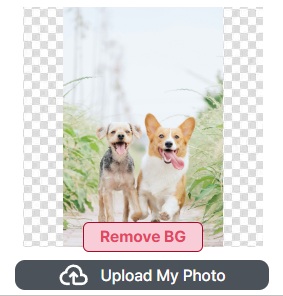
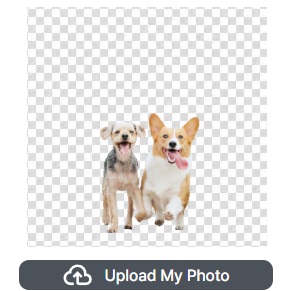
Upload any photo or drawing as it is, and the background is removed automatically, with a body cut line drawn along the outline of what's left. The silhouette comes through exactly as is once it's standing as an acrylic stand. No manual masking, no pen tool.
Key features
Whether you make merch or run a print shop, the repetitive work disappears and the file arrives ready to print.
Upload an image and only the subject is kept, cleanly. No manual masking needed.
The cut line is generated automatically along the subject's outline. Stand it up in a die-cut shape, exactly the silhouette you want.
A base that holds the body upright is generated along with it. The slot is included, so it stands up as soon as you assemble it.
A white ink layer and transparency are handled automatically so colors don't wash out on clear acrylic. For print shops, that means no more setting up white and overprint by hand.
See the acrylic stand, slotted into its base and standing upright, in 3D. It shows the real shape before anyone places an order.
Download a print-standard PDF with the body and base cut lines and white layer included, ready to hand to production.
Who it's for
One design becomes the print file itself. Start with whatever you came here to do.
Individuals · creators · fan goods · small runs
B2B · Shopify / WooCommerce · order automation
For print shops & makers
Even orders mixing stand bodies and bases are automatically arranged onto one sheet, all the way through to print-ready — with no repetitive work. People step in only where a judgment call is actually needed.
FAQ
Customers can create and preview a stand in a web browser on desktop or mobile. Print shops can separately connect the resulting files to Pressria Bridge for production preparation.
Yes. A base that holds the body upright is generated along with it. Cut lines are created automatically for both the body and the base, the slot is included, and it's all packaged into the print-ready PDF, ready to assemble and stand up.
No. Upload an image and the background is removed, with a body cut line generated automatically along the subject's outline. The base cut line is created together with it, straight through to the print-ready PDF.
No. A white ink layer is automatically placed behind your colors, so they stay vivid even on clear acrylic. The white layer is generated to match your design, so there is nothing for you to prepare.
Yes. Customer designs become print-ready PDFs with body and base cut lines and a white layer. WooCommerce can open the editor on the product page, while Shopify can open it after purchase. Pressria Bridge can then prepare the body-and-base parts for production nesting.
You can make free-form (die-cut) acrylic stands that follow the outline of your subject. People, characters, photos — any image you want to display upright, made exactly as you upload it.
Customers need only a browser—no cut-line work or base blueprint to draw. One image is enough to get started.