
1. Home
  2. Apparel
  3. T-Shirt
Design in the browser

Custom t-shirt printing,
no software just a browser

Upload an image and the background comes off and it lands inside the print area. The white layer for dark fabric is built for you, and what comes out is a print-ready file. A browser is all you need.

See how it works

No install · desktop & mobile · white layer generated automatically

Pressria t-shirt web editor — an uploaded image placed inside the print area
Upload an image → white layer, automatic
✔ No install, straight from the browser
✔ Background removal + white layer generated automatically
✔ Print-ready file, generated for you
✔ Connects to your storefront
✔ Works on desktop and mobile

How it works

Three steps from image to print-ready file

No design software, no print-spec work. Upload, place, download — that's the whole job.

1

Upload an image

Upload the artwork, photo or logo as it is. The background is removed for you.

2

Place it in the print area

Size and position it inside the t-shirt print area. The area itself is already fixed by the product template.

3

Take the print-ready file

A print-ready file with the white layer included is generated straight away — hand it to production as it is.

Background removal

Upload a photo and only the subject stays

Artwork or photograph, upload it as it is. The background comes off the moment it lands, so no rectangle of background ends up printed on the shirt. No cutting it out by hand, no reaching for the pen tool.
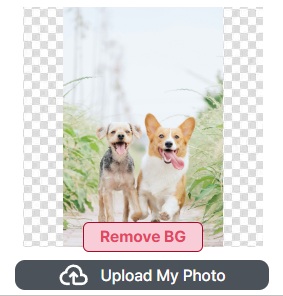
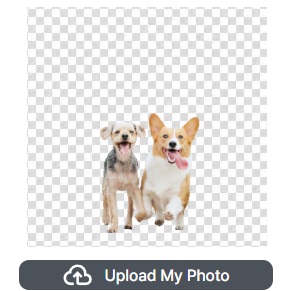
Handled the moment you upload Only the subject, cleanly Transparent background, ready to use
Before background removal — the uploaded photo of two dogs with its original background still there
Before · the photo you uploaded
After background removal — the same two dogs with the background turned transparent
After · background removed

What it does

Exactly what t-shirt printing needs, and no more

Whether you make one shirt or run a print shop, the repetitive work goes away and the file comes out ready.

Background removed automatically

Upload an image and only the subject stays. Nothing to cut out by hand.

white layer generated automatically

Colour holds on black, navy and other dark fabric: the white ink layer and the transparency handling are built to match the design. For a print shop, setting white and overprint by hand stops being a task.

Print area templates

Every product has its printable area fixed as a template, so the customer only moves and resizes inside it. A design that breaks the spec never reaches print.

Cut line generated automatically

Where the outline has to be cut — transfer film, stickers — the cut line is drawn around the subject for you.

Print-standard PDF output

Download a print-standard PDF with the white layer and cut line already in it, and use it as it is.

Automated nesting (gang run)

Designs from many orders are gathered onto one sheet automatically. Layout work that used to be moved piece by piece finishes in seconds.

Who it's for

For one shirt, and for a print floor

One design becomes a print-ready file. Start from whichever end you're on.

Making a shirt of your own

Individuals · creators · small runs

  • Design in the browser, with no design software
  • Put your own artwork, photo or logo on a shirt
  • Comfortable to edit on a phone too

Print shops · sellers

B2B · order automation · less layout work

  • Customer uploads an image → print-ready file, converted for you
  • Connect the editor to your storefront → orders arrive on their own
  • White layer, transparency and overprint set automatically
  • Gang-run layout that gathers many orders onto one sheet, in seconds
  • From order intake through to print-ready, connected
Talk to us

If you run a print floor

The editor is the entrance. The real work is what comes next — automated nesting.

However many t-shirt orders pile up, the designs are gathered onto one sheet automatically and carried through to print-ready.

Everyone has an editor. What differs is whether the edited design is laid out on the sheet and carried through to print-ready on its own. See how automated nesting places many orders onto a single sheet.

FAQ

Common questions

Do I need to install anything?

No. A web browser is all you need. You can design on desktop and on mobile alike.

Will colour stay vivid on a dark t-shirt?

Yes. A white ink layer is laid behind the colour automatically, so it stays vivid on black, navy and other dark fabric. The white layer is generated to match the design, so there is nothing for you to build.

Do I have to fit the design into the print area myself?

No. Every product has its printable area fixed as a template, so you only move and resize inside it. A design that runs outside the area does not carry through to print.

Can it connect to my store?

Yes. The editor can be connected to your storefront so customer-designed orders arrive on their own. Each order carries through to a print-ready file with the white layer included.

Which storefronts are supported?

Naver Smart Store is live today. WooCommerce and Shopify integrations are in preparation — tell us where you sell and we will let you know as they land.

Can a print shop use this?

Yes. Designs your customers upload are converted into print-ready files with the white layer and cut line included. Transparency and overprint are set automatically, and orders carry on into automated nesting (gang run), which cuts the time from order intake to print-ready sharply.

Can I make things other than t-shirts?

Yes. The same pipeline covers print-on-demand items like tote bags, mugs and phone cases, and also acrylic keychains·acrylic stands·korotto and other die-cut acrylic products.

Make a shirt of your own, right now

No install, no print-spec work. One image is enough to start.