
Just upload an image. The background is removed, the cut line is generated automatically, and a print-ready PDF comes out the other side. A browser is all you need.
No installation · Works on desktop & mobile · Automatic cut line


Finished product
Place the hardware hole inside or outside the artwork in the editor. After production, a small connector ring passes through the acrylic hole and attaches to the swivel ring beneath the D-ring clip, creating the finished keychain shown here.
The same prepared hole can also be used with ball chains and other common keychain hardware.
How it works
No design software, no manual cut lines. Upload, arrange, download — that's it.
Upload any drawing or photo as it is. The background is removed automatically.
Arrange it to fit the keychain size and the cut line is generated automatically. You choose where the ring hole goes.
A print-ready PDF including the cut line is created right away. Send it straight to production.
Background removal
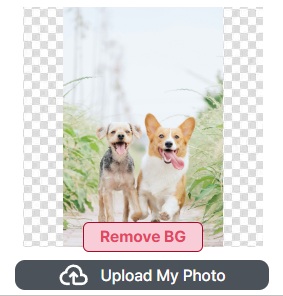
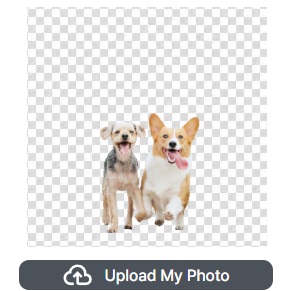
Drop in any drawing or photo. The background is removed automatically the moment you upload, and a cut line is drawn along the subject's outline — no manual masking, no pen tool.
Double-sided printing
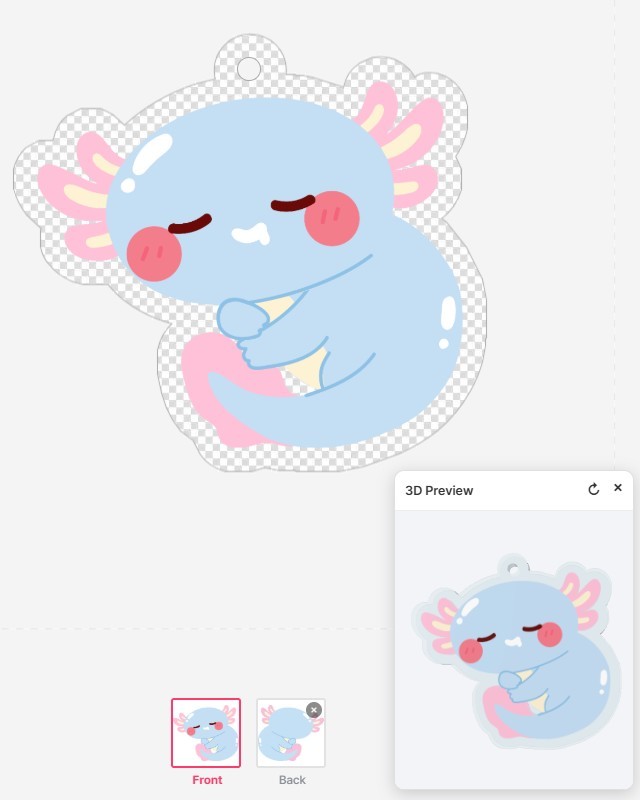
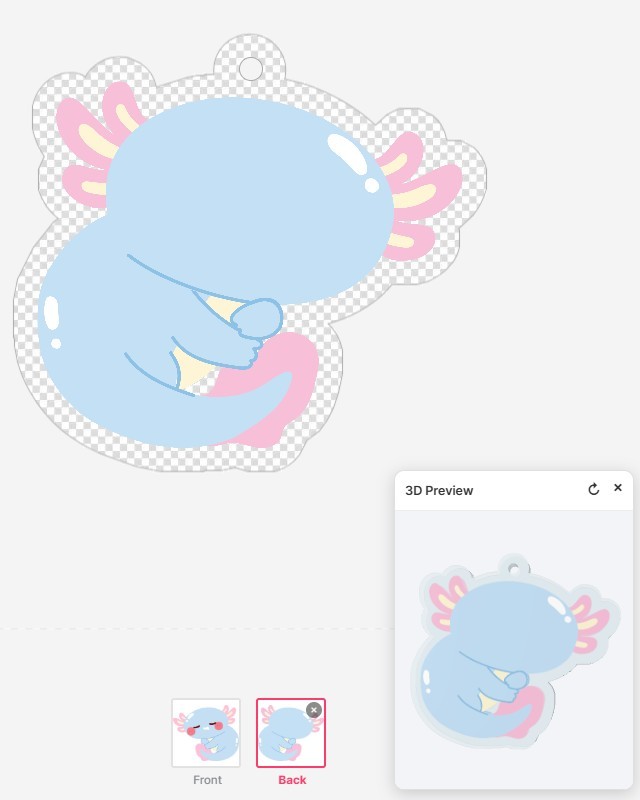
Upload a different image for the front and the back. The cut line is built from the front image alone, so both sides are die-cut to exactly the same shape and the back artwork is fitted inside it automatically. Front view on one side, back view on the other — flip it over and you get a different picture.
Key features
Whether you make merch or run a print shop, the repetitive work disappears and the file arrives ready to print.
Upload an image and only the subject is kept, cleanly. No manual cut-outs.
The cut line is generated along the subject's outline. Die-cut and kiss-cut shapes are supported.
Place the keychain ring hole wherever you want, and check the finished shape before you order.
A white ink layer and transparency are handled automatically so colors stay vivid on clear acrylic. For print shops, that means no more setting up white and overprint by hand.
Put a different image on the front and the back. The cut line stays the same for both sides, and you can flip the keychain in the 3D preview to check it.
See the finished acrylic keychain in 3D — the real shape, before anyone places an order.
Download a print-standard PDF with the cut line and white layer included, ready to hand to production.
Who it's for
One design becomes the print file itself. Start with whatever you came here to do.
Individuals · creators · small runs
B2B · Shopify / WooCommerce · order automation
The difference
Upstream, the Illustrator plugin turns your source files into editable product templates. Downstream, cutlines, white layers and automated nesting carry each order to the moment before print. People step in only where a judgment call is actually needed.
FAQ
No. All you need is a web browser. You can design right away on both desktop and mobile.
No. Upload an image and the background is removed and a cut line is generated along the subject's outline. The print-ready PDF is created automatically as well.
Yes. On a double-sided product the editor shows Front and Back tabs at the bottom, and you can upload an image for each. The cut line is generated from the front image only, so both sides are die-cut to exactly the same shape and the back artwork is fitted inside it. You can flip the finished keychain in the 3D preview.
No. A white ink layer is automatically placed behind your colors, so they stay vivid even on clear acrylic. The white layer is generated to match your design, so there is nothing for you to prepare.
Yes. Customer designs are converted automatically into print-ready PDFs that include the cut line and white layer. Transparency handling and overprint are set automatically, so you no longer have to build cut lines and white by hand in Illustrator — which cuts the time from order intake to print preparation significantly.
You can make free-form (die-cut) acrylic keychains that follow the outline of your subject. You can also place the ring hole wherever you like.
No installation, no cut-line work. One image is enough to get started.